claude-code-slides
Hooks & Security — Setup Guide
Related slides: Slide 13 — Protect Your Secrets, Slide 14 — Control Agent Access
Official docs: Claude Code Hooks · Claude Code Security · Claude Code Permissions
Why Hooks?
Settings-based permissions are interpreted by the LLM — it can rationalize exceptions, especially in long sessions. Hooks are deterministic. They run shell commands at lifecycle points with binary pass/fail. No LLM involved, can’t be convinced otherwise.
PreToolUse   → runs BEFORE the agent acts     → exit 0 = allow, exit 2 = block
PostToolUse  → runs AFTER the agent acts      → validate output
Notification → runs on events                 → status line, alerts
Reference: paddo.dev/blog/claude-code-hooks-guardrails
Security Rules with Hookify
Hookify is an official Anthropic plugin that creates hooks from natural language — no manual JSON editing.
# Install hookify
claude plugin install --marketplace claude-plugins-official hookify

# Create a hook
> /hookify Block rm -rf commands targeting home directories
Pre-built Security Rules
These are hookify rules I run globally (~/.claude/). Each one is a .md file with a regex pattern and a block/warn action.
1. Block force push
name: block-force-push
event: bash
action: block
pattern: git\s+push\s+.*(-f|--force|--force-with-lease)
Force pushing rewrites remote history and can destroy teammates’ work. Do it manually if you truly need to.
2. Block rm -rf on home directories
name: block-rm-rf-home
event: bash
action: block
pattern: rm\s+-rf\s+.*(/Users/|~/|\$HOME|/home/)
Prevents catastrophic recursive deletion of home directory paths.
3. Detect hardcoded secrets in code
name: block-hardcoded-secrets
event: file
action: warn
conditions:
  - field: new_text
    operator: regex_match
    pattern: (API_KEY|SECRET|TOKEN|PASSWORD|PRIVATE_KEY|ACCESS_KEY|CLIENT_SECRET)\s*[:=]\s*['"][^'"]{8,}['"]
Warns when the agent writes what looks like a hardcoded credential. Suggests env vars or secrets managers instead.
4. Protect .env files (file access)
name: protect-env-files
event: all
action: block
conditions:
  - field: file_path
    operator: regex_match
    pattern: (^|/)\.env($|\.(?!example).*)
Blocks reading or editing
.env,.env.local,.env.production, etc. Allows.env.examplefor documentation.
5. Protect .env files (bash commands)
name: protect-env-files-bash
event: bash
action: block
pattern: cat\s+.*\.env|less\s+.*\.env|head\s+.*\.env|tail\s+.*\.env
Catches bash commands that try to read
.envfiles directly.
Creating Your Own Security Rules
# Natural language → hookify generates the rule
> /hookify Block any npm publish commands
> /hookify Warn when writing files outside the project directory
> /hookify Block database DROP TABLE commands
Or use /hookify without arguments to analyze your conversation history and suggest hooks for mistakes that happened.
Use Case: Status Line
Hooks can enhance your terminal UI. The Notification event fires on every status change, letting you render a custom status bar.
claude-hud
A visual HUD showing model info, context usage, active tools, and task progress.
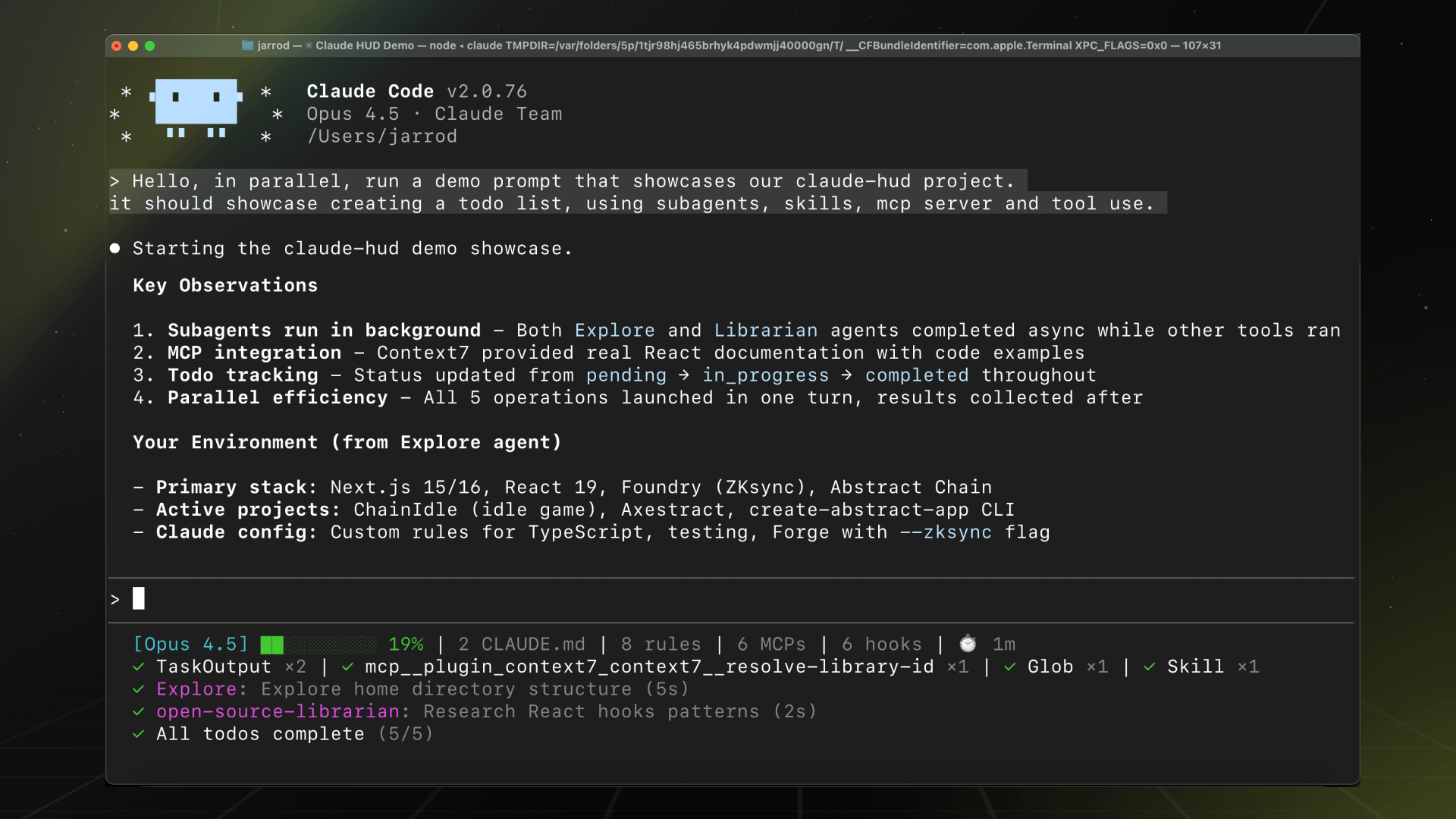
- Repo: github.com/jarrodwatts/claude-hud
- Install:
claude plugin install --marketplace claude-hud claude-hud - Shows: Model, branch, context usage bar, active tool, agent status, task progress
ccstatusline
A powerline-style status formatter with widgets, emoji support, and auto-alignment.
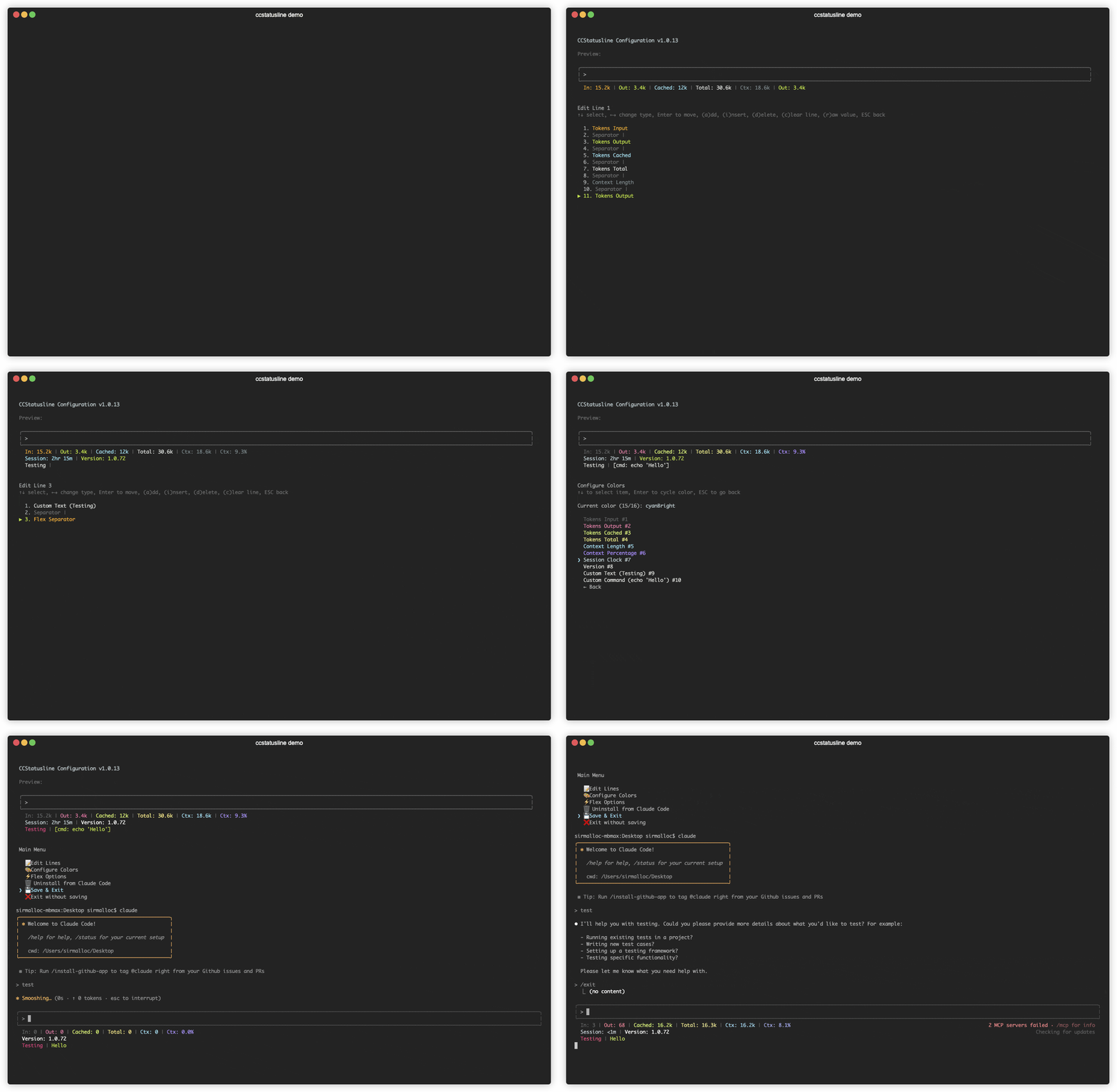

- Repo: github.com/sirmalloc/ccstatusline
- Install:
npm install -g ccstatusline - Shows: Session cost, block timer, CWD, powerline styling, emoji widgets
Because everyone deserves a nice terminal UI.
Use Case: Custom Search with Perplexity
Claude Code’s built-in WebSearch may not work behind corporate proxies. I created a hook-based plugin that intercepts search and routes it through Perplexity’s Sonar model — a more agentic search engine.
How it works: A PreToolUse hook intercepts WebSearch calls, sends the query to Perplexity Sonar via a LiteLLM proxy, and returns results — all before the default search runs.
# Add the marketplace
/plugin marketplace add https://github.tools.sap/I773117/claude-perplexity-search.git

# Install
/plugin install perplexity-search@claude-perplexity-search
# Configure
export PERPLEXITY_PROXY_URL="http://localhost:6655/litellm/v1/chat/completions"
export PERPLEXITY_API_KEY="your-key"
- Repo: github.tools.sap/I773117/claude-perplexity-search — if you find it useful, give it a star!
- Why: Works behind corporate proxy, uses Sonar for more agentic search results
- How: PreToolUse hook intercepts WebSearch → routes to Perplexity API
More Use Case Ideas
Hooks are a programmable extension point — the possibilities are endless:
| Use Case | Hook Event | What It Does |
|---|---|---|
| Auto-format on save | PostToolUse (Edit/Write) | Run prettier/eslint after file edits |
| Lint gate | PostToolUse (Edit) | Block commits if linting fails |
| Cost tracking | Notification | Log token usage to a file or dashboard |
| Slack notifications | PostToolUse | Post to Slack when tasks complete |
| Auto-commit | PostToolUse (Edit) | Auto-commit after each successful edit |
| Screenshot on error | PostToolUse (Bash) | Capture terminal state when commands fail |
| Branch protection | PreToolUse (Bash) | Block operations on main/master branch |
| Token budget | PreToolUse | Warn when approaching context limit |
The pattern is always the same: event → regex/code check → allow or block. If you can write a shell script for it, you can make it a hook.
Quick Reference
# Install hookify
claude plugin install --marketplace claude-plugins-official hookify

# Create hook from natural language
> /hookify Block dangerous rm commands

# Create hooks from conversation mistakes
> /hookify

# List all rules
> /hookify:list

# Enable/disable rules
> /hookify:configure
Further Reading
- Claude Code Hooks docs — Official reference
- Claude Code Security docs — Security overview
- paddo.dev: Hooks as Guardrails — Deep dive
- hookify — Official Anthropic plugin
- claude-hud — Visual status HUD
- ccstatusline — Powerline status formatter
- claude-perplexity-search — Perplexity search hook (give it a star!)